I may be recruiting a team of testers some time as a requirement for
Google Play Store. In the meantime users preferring dedicated apps
can download simple Android WebView wrappers here. Offline versions
could be provided if requested, but would require a lot of images.
No permissions are required of your device other than the WebView's
own local storage to save app data and user preferences. Please click
the icons below to download, then follow the instructions.
World Flags
Film Stars
US States
GB Counties
Historic Buildings
Coe Operations Universal Key Facts Launcher
Key Facts
There was an error in the initial release of Key Facts due to an omission
in its manifest file that caused it to reload with changes of orientation.
The corrected installer was uploaded at 15:35 GMT 04/10/2026. Please
accept my apologies if you downloaded and installed the version posted
earlier that day.
Key Facts can now be installed directly in Chrome on Android devices.
Please see the News page for further information.
Instructions
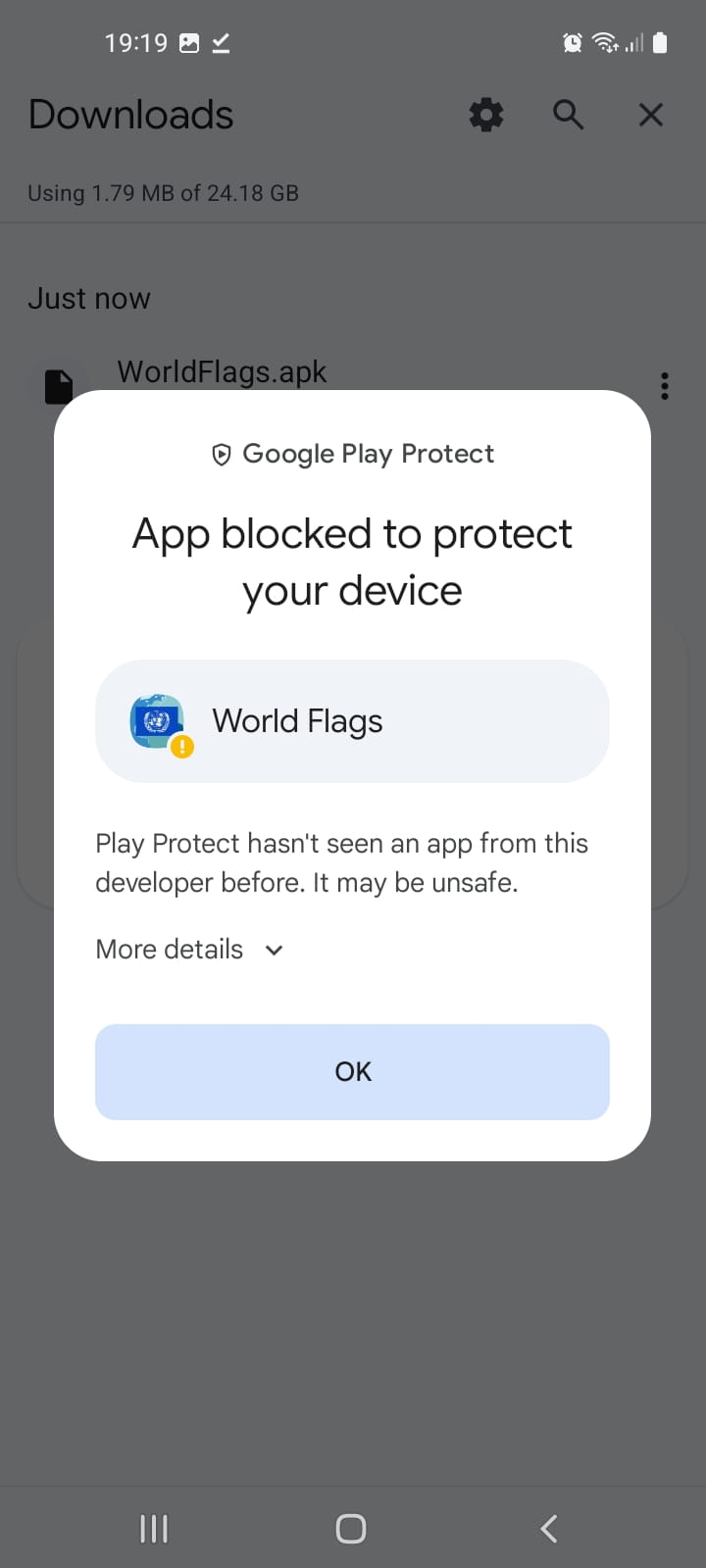
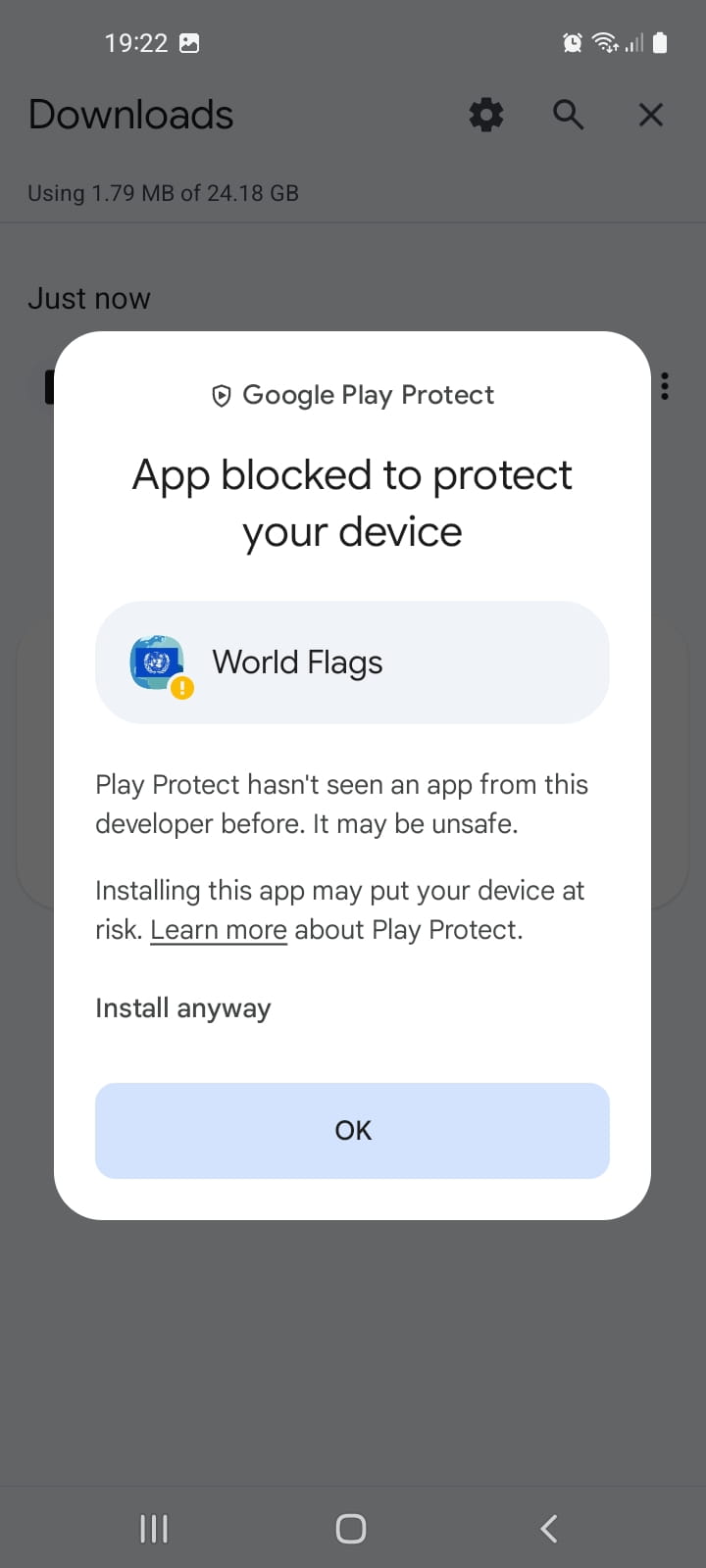
Because I am not registered with Play Store, you may be presented with the
Google Play Protect Screen. Tap 'More details' for the second screen then
'Install anyway', as shown below. You may delete the apk file when finished.
To install on a child's phone or tablet with the Family Link app, you need to
temporarily disable the 'Apps from Unknown Sources' setting.
Open Family Link on the parent's device and select the child's profile. Navigate
to Device Settings: 'Controls', 'Device' then 'Settings'. Locate and select
'Apps from Unknown Sources' and toggle to the 'On' position.
Download the apk file to the child's device, then click and follow the prompts
to install. Restore the Unknown Sources setting after the app is installed.
Android App Source Code
The above apps do no more than show their corresponding web pages in a WebView,
launch any clicked hyperlinks in your default web browser and handle keeping
the screen on as the following Main Activity source code shows.
There are more calls than strictly necessary to prevent the screen staying on
while the app is inactive. My own issues were likely related to Developer options
settings and putting my phone on charge when the screen was on.
package com.example.worldflags;
import android.app.AlertDialog;
import android.content.Intent;
import android.content.res.Configuration;
import android.net.Uri;
import android.os.Bundle;
import android.os.Handler;
import androidx.annotation.NonNull;
import androidx.appcompat.app.AppCompatActivity;
import androidx.core.graphics.Insets;
import androidx.core.view.ViewCompat;
import androidx.core.view.WindowInsetsCompat;
import android.os.Looper;
import android.view.View;
import android.webkit.WebResourceError;
import android.webkit.WebResourceRequest;
import android.webkit.WebResourceResponse;
import android.webkit.WebSettings;
import android.webkit.WebView;
import android.webkit.WebViewClient;
import androidx.activity.OnBackPressedCallback;
import android.webkit.JavascriptInterface;
import android.widget.ProgressBar;
public class MainActivity extends AppCompatActivity {
private String rolling = "0"; // Rolling Display
private WebView mywebView;
private ProgressBar progressBar;
private final Handler myHandler = new Handler(Looper.getMainLooper());
// Handler to receive update UI message
private final Runnable updateUI = () -> {
// Update the UI to keep screen on in Rolling Display Mode
screenOn(rolling.equals("1"));
};
private void screenOn(boolean keep) {
mywebView.setKeepScreenOn(keep);
mywebView.invalidate();
}
@Override
protected void onCreate(Bundle savedInstanceState) {
super.onCreate(savedInstanceState);
setContentView(R.layout.activity_main);
ViewCompat.setOnApplyWindowInsetsListener(findViewById(R.id.main), (v, insets) -> {
Insets systemBars = insets.getInsets(WindowInsetsCompat.Type.systemBars());
v.setPadding(systemBars.left, systemBars.top, systemBars.right, systemBars.bottom);
return insets;
});
getOnBackPressedDispatcher().addCallback(this, new OnBackPressedCallback(true) {
@Override
public void handleOnBackPressed() {
// Ensure screen doesn't stay on
screenOn(false);
if (mywebView.canGoBack()) {
mywebView.goBack();
} else {
finish();
}
}
});
mywebView = findViewById(R.id.webview);
progressBar = findViewById(R.id.progressBar);
mywebView.setWebViewClient(new WebViewClient() {
// Override default error messages
@Override
public void onReceivedError(WebView view, WebResourceRequest request,
WebResourceError error) {
view.loadUrl("about:blank");
showErrorDlg();
}
@Override
public void onReceivedHttpError(final WebView view, final WebResourceRequest request,
WebResourceResponse errorResponse) {
view.loadUrl("about:blank");
showErrorDlg();
}
@Override
public void onPageFinished(WebView view, String url) {
progressBar.setVisibility(View.GONE);
super.onPageFinished(view, url);
}
});
WebSettings webSettings = mywebView.getSettings();
webSettings.setCacheMode(WebSettings.LOAD_DEFAULT);
webSettings.setJavaScriptEnabled(true);
// Enable DOM storage API for localStorage
webSettings.setDomStorageEnabled(true);
// Enable pinch zoom
webSettings.setBuiltInZoomControls(true);
webSettings.setUseWideViewPort(true);
webSettings.setDisplayZoomControls((false));
webSettings.setSupportZoom(true);
mywebView.addJavascriptInterface(new WebAppInterface(), "AndroidInterface"); */
mywebView.loadUrl("https://coeoperations.com/wf/wf.html");
}
// Prevent WebView reloading on orientation change - also requires
// android:configChanges="orientation|screenSize" in AndroidManifest.xml
@Override
public void onConfigurationChanged(@NonNull Configuration newConfig) {
super.onConfigurationChanged(newConfig);
}
@Override
protected void onPause() {
// Ensure screen doesn't stay on
screenOn(false);
super.onPause();
}
@Override
protected void onResume() {
// App coming to foreground
screenOn(rolling.equals("1"));
super.onResume();
}
public class WebAppInterface {
@JavascriptInterface
public void postMessage(String message) {
// Message from JavaScript...
if (message.equals("0") || message.equals("1")) {
//... with updated Display Mode - needs posting to UI thread
rolling = message;
myHandler.post(updateUI);
} else if (!message.isBlank()) {
//... with URL
Intent browserIntent = new Intent(Intent.ACTION_VIEW, Uri.parse(message));
startActivity(browserIntent);
}
}
}
public void showErrorDlg() {
AlertDialog.Builder builder = new AlertDialog.Builder(this);
builder.setTitle("World Flags")
.setIcon(R.drawable.ic_launcher_foreground)
.setMessage("Network Error. Please check your Internet connection.")
.setCancelable(false)
.setNegativeButton("OK", (dialog, id) -> {
dialog.cancel();
finish();
});
AlertDialog alert = builder.create();
progressBar.setVisibility(View.GONE);
alert.show();
}
}